Showing posts with label android. Show all posts

Tuesday, October 08, 2013

App Review: Stitcher vs Player.fm for podcast playing

So from time to time I attempt to review apps that I use or am deciding between. Way back I use to do reviews and post for PalmAddict when I was using my old Treo600/650... regardless occasionally I like to share what I'm using on my phone. The latest internal debate I've been having is over podcast players (yes I'm again listening to podcasts, occasionally I run out of audiobooks to listen to and have to wait for one on hold to become available). There are a number of players out there, but I have 3 main needs: 1. android app, 2. web-based player and 3. syncing across devices and web. The two players I've discovered:

So both have my basic 3 needs... so what does one add over the other.... not much.

So what I've come to notice is that Stitcher does a much better job at synchronizing between devices, but the queue functionality of Player.fm is much more to my liking. Interesting enough, one of the features I liked best about Player.fm was its offline listening, but today (10/8) Stitcher released an update to its app providing the same functionality. So ultimately it comes down to UX... for the moment Player.fm is winning in terms of the mobile app. I find the interface easy to use (not that Stitcher is not) and clean. This said, from the webapp perspective I have to side with Stitcher. Player.fm's web interface to me just doesn't work, thankfully 90% of my podcast interaction is mobile, so for now I'll be using Player.fm. I'm hoping that their webapp gets some needed love in the near future.


Wednesday, August 21, 2013

Kindle Fire fun

So I've been debating which tablet to get for a awhile, and back on my birthday I decided I was definitely getting something. So in the end I was between the Nexus 7, the B&N Nook HD and the Kindle Fire HD 7". Once the Nook received the update to be a Google certified device and received the Play Store, it almost won out, but I didn't like the fact  that it didn't use a standard usb cable for charging. I hate carrying multiple cables when traveling.
Long story short, after reading how easy it was to root a Fire I decided to go that route, then came the best part, I probably wasn't going to have to root the Fire. So currently that is what I've got, a Kindle Fire HD which runs Android 4.0, an  I've got it running most of the Google apps I want with out rooting.
What I've got running:
Gmail
Talk (now Hangouts which works even better)
Google+
Drive
YouTube
Blogger (which I'm using to type this out)
Google Play Store (well not fully)
Google Play Services

the trick: dropbox (actually any cloud storage) and es file explorer. Using es, I was able to backup the apps I wanted from my SG3, copy them to dropbox and then download and install on the Kindle. Yes it is a bit of work... but it is not like apps update everyday. The only issue I've run into is that I can't get the latest Google+ to work, oh well.

update (plus actual posting) so new friend to getting software onto my Kindle: http://www.1mobile.com/

Friday, September 09, 2011

Baby tracking at its simplest with more

About a month before my daughter was born, we started discussing baby tracking. We are not talking about thr first step/first word kind of thing, we are talking about the real basics: eat, sleep, and poop.
Initially we discussed the old pen and paper format, which is the example the hospital gave, but while the pren and paper were always nearby in the hospital setting, at home with the baby we knew we'd never be able to find a pen. So we figured digital.
There see a handful of dedicated devices but most in my mind were too small and would probably get lost in all the baby stuff. So, I started looking at smartphone apps. These days how often are our phones not next to us?
There are more than a fair few apps on the market, but many are either too simple or too complicated to be useful. In steps Baby Daychart. Its UI is simple, but it packs just the right number of features.
While it provides the same basic taking features as the test, the two biggest one for us...what a bottle its filed with, and sharing/sync. What I like about Baby Daychart is that unlike most of the other apps that make you sign up for sync accounts, this one simply uses dropbox.
I could probably list a dozen other reasons why I like this one over the others, but baby is awake.

Friday, July 22, 2011

One handed typing with Swype

So when Swype others came out a year or so ago I gave them all a try. At the time I thought they were nifty ideas but I still preferred my physical keyboard, but since the birth of my daughter, I've grown a complete new feel for things.
Partially it has to do with the layout of the physical key on my G2 (and my G1 before that) but the ability to type one-handed is a must when holding an infant. Ideally you shouldn't be messing with your phone while holding your baby, but sometimes it is a must.
So in step Swype. Swype has been great. It allows me to type with one-hand while holding my baby girl. Unfortunately you can't get Swype on the Android Market, but there are others like SwiftKey that provide similar behavior.
I've posted about Swype in the past (http://ckcin.blogspot.com/2010/10/android-keyboards-swype-vs-access.html) but now I think it is a must for me on all my phones..plus it may help me one day switch to a touchscreen only phone.

Saturday, October 30, 2010

Android Keyboards: Swype vs Access


VS


So a while back I picked up the Audiobook: "The Salmon of Doubt: Hitchhiking the Galaxy One Last Time" and yesterday while listening he discussed his Palm Psion and it got me thinking about my original handheld. I picked up my first Palm OS device when I was finishing undergrad. It was a Handspring Deluxe. Which reminded me of the availability of Access's Graffit for Android app, which I really liked on the G1 since the default keyboard was never that great. But the G2 came with Swype.

So I tried Swype when it first arrive as public beta, but it never really worked well on the G1. Graffiti was great since I already new it, but was never perfect...thank goodness, the G1 has probably the best physical keyboard available.

So Graffiti is fun to use, but really only if you already know it, but when I first learned it, I used a stylus. Unfortunately it is not as quick and accurate when using your finger. Plus its been a while since I've used it...I use to be able to scribble out notes in meetings almost as fast as I could write on paper, but without the stylus...not so great.

Enter Swype. Swype looks like any other virtual keyboard and at the basic viewpoint, it works just like one. You can type letter by letter like any other virtual keyboard. But the fun part is... when you swype your finger from one letter to another letter without lifting your finger...you get full words. Takes a little more practice but you quickly get the hang of it and you don't need to learn any special scribbles.

Bottom line is that I prefer a physical keyboard, but...Swype definitely makes the virtual keyboard useful.

Monday, October 25, 2010

Another Late Phone Friday: Joys of the G2 watching a new Android fan being born.

So we've had our G2s for a bit more than a week now. And from what I can tell as an observer, my wife is loving hers. Kind of funny, we've been on a shared family plan for close to 6 years now, but this is the first time we've both had the same phone. When we switch to T-Mo over 3 years ago,I kept my unlocked Treo650 and we got her the current Pearl. Year later I got the G1, but now we are both on the G2.

When I first convinced her she needed a 'smarter' phone I convinced her to go Blackberry (with the help of another friend who had been a Blackberry fan forever, even though I here she is considering switching to Android now too). She selected the White Pearl and instantly was happy. She started her MBA program and the tech department connected her BB to the schools mail system and she was even happier. We installed the Google Apps on it and she was happier.

But now she has a G2. So far it seems like she is really liking it. I can't totally tell if she likes it more for the smartphone part of it, or the games she's downloaded from the Market. Either way she likes it. It is taking her some time to get use to touching the screen, but it is funny to see her touch other screens thinking they'll move her phone.

So I have plans to 'interview' her about her new phone, but I'm finding it hard to find time. Bottom line is that she likes, I like it, and we are both happy we've upgraded.

Friday, October 15, 2010

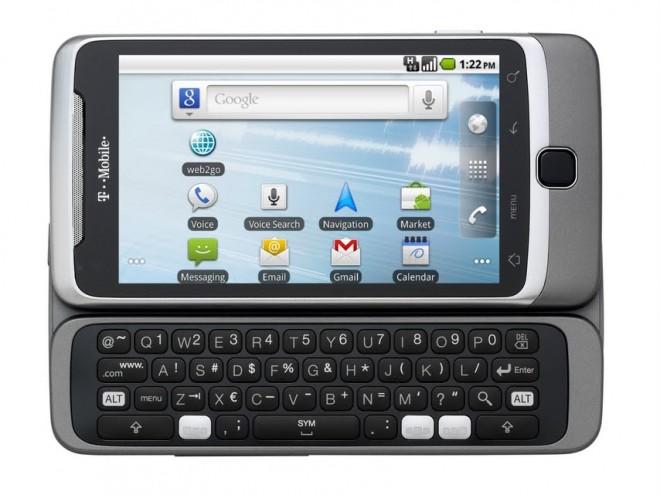
Phone Friday: my new G2

So I've roughly had my G2 for about 24hrs... I'm really liking it. Unfortunately not the same affect that my G1 had on me when I first got it, but it is a really slick phone. The screen is beautiful, the speeds are amazing.

Battery life.... hard to say, The battery lasted approximately 14 hrs, but that included lots of time spent playing with the new G2... so I'm sure I drained it a bit more than would be found on a normal usage.

4G is amazingly fast.... really hard to tell when I'm on 4G and when I'm on WiFi. Of course I'm lucky to live in an area that seems to be fully covered by 4G.

So as with any new gadget/toy.... nothing is ever perfect. So what I'm not happy about:

So it has this amazing screen, but its still stuck with only a 4x4 icon display. I guess I got use to my 4x5 display I had with my rooted G1. Yeah it has 7screens available, but I was happy with my custom set 4 with ADW and CM6.

The only other complaint I have is the keyboard. I still don't understand what was so wrong with the 5 row for the number keys. I just hope that this is something I'll get use to.

So the best part about this new phone has to be the loads of space I now have. The G1 had a whole whopping 256 MB of storage space, with Eclair I was able to use the apps2ext which gave me lots of space, but with Froyo and its native Apps2SD... not so much. But the G2.... well it has 4GB of space... I look forward to using all of it! Currently here is what I've got installed:

Friday, September 24, 2010

Phone Friday: My Next Phone?

 So 2 weeks ago I mentioned that in my next post I'd discuss the new G2 by Google for T-Mobile. I had initially planned to write this last week, but then I remembered that last Friday was Yom Kippur. Anyways... better late than never and especially now that the G3 is officially available for pre-order.

So when the G1 was announced I ordered it that same day.... so I guess the question is, why have I not already ordered the G2. Well that is hard to say. It was easy to select the G1... it was the first of its kind, it was revolutionary, it was amazing. The G2... well its great too.... but is it that great?

It has the 3 main requirements I think every smartphone should have:

  1. a state-of-the-art OS, such as Android
  2. a touchscreen (preferably big enough to be clear and useful)
  3. a qwerty physical keyboard (virtual is nice, but nothing compared to the tactile feel of real keys)
The G2 also has one other key feature I think should be default on any smartphone that wishes to play the role of a convergence device... a 3.5mm audio jack.

So what separate this from other devices.... well see that is why I've not purchased it already. The HTC/T-Mo MyTouch Slide, the Verizon Droid2 from Moto and the Samsung Epic 4g on Sprint among many other phones have these same main features. 

So why will I most likely order this device... well probably because I like Android as it is. All the other phones have some sort of modified interface, HTC Sense's they know what I want, Moto has Blur'd the interface and Samsung's TouchWiz... just ain't wise enough for me... okay enough of the cheese. I like the UI as Google designed it. If I wanted something else, I'd be running one of the many ROMs available for my G1, but nope I'm running CM since it is as close as you get to Vanilla when it comes to the UI.

So there you have my reasoning and my question... I'll update you all if/when I order one.All said, I'm debating just waiting till the 6th when it arrives in stores.

Sunday, September 12, 2010

Belated Phone Friday: Apps currently on my phone

So like I figured.... I knew I'd miss one or at least be late. So here it is... late better than not.

Last week I listed sites to help get you started with Android. Today I'd like to discuss further one of those sites: http://appbrain.com.

AppBrain helps you interact with the App Market via a simple web interface Plus with the help of its two sister apps 'AppBrain App Market' and 'Fast Web Installer', you can search and install apps from either the web or the application. But one of my favorite parts about AppBrain is that it keeps track of what you have on your phone and allows you to share your list with others.

So here is my list: plus the nice part is that it will automatically update when I update my list


Next week: hopefully I'll give a full rundown of what I think my next phone will be now that the G2 was officially announced last week.

Friday, September 03, 2010

Phone Friday: sites to get you started with Android

So it seems like lately the only posts I've managed to maintain doing is this "phone friday" concept that my friend Ben suggested. This week I'd like to discuss something slightly different but related. Instead of discussing what I'm doing with my phone, some suggestion on how to get started with your phone.

So why this post.... well on Tuesday, my boss asked me a bunch of questions since she is thinking about going 'Droid' and then yesterday my dad started asking me a bunch of questions since he had just ditched his Windows Mobile Moto Q in favor of the 'Droid2'... and this after a good friend of mine from Miami got the Evo (the same friend who convinced me to get my first Treo). Also another friend of mine upgraded from the Centro to an Evo too.... but basically all of them know that I've been using Android since the start. I ordered my G1 minutes after the site went life after the Google T-Mo announcement was made and it arrived in hand the day before it hit stores.

Anyways so for those out there new to Android or considering it.... the basic question I get is 'is there an app for X' and the basic answer is... most likely. (not yes since I'm sure that there is always one feature/app missing from every phone market).

So some suggestions if you are planning to make the switch to Android first stop.... the blogosphere (in no order):

These sites are great for news and rumors about whats to come and for app reviews.

Now on the app front a few sites to check out, they all provide a web-based look at the Market.
  • http://www.appbrain.com/ - this is a must... plus make sure to install the "Fast Web Installer" so you can install apps directly from the site. 
  • http://www.cyrket.com/m/android/ - the first site to provide web access to Market... this site is also good if you don't use Android since it also provides a window into apps for WebOS and WinMo (sorry iPhone users... you're out of luck)
  • http://www.androlib.com/ - just another site.... also provides QR Codes which you can scan from your phone to go directly to links in Market
Now for those who like to get into 'trouble' and hack with your phones... (attempt at your own risk)
  • http://www.cyanogenmod.com/ - probably the most popular Rooted Mod out there, initially started as a one-man project, but the team that has formed around it is amazing...hell they've got FroYo 2.2 running on a G1 (which I'm currently using)
  • http://androidspin.com/ - great site for information on mods/roms and other hacks for Android.... plus a great source of news relating to rooted phones.
  • http://www.xda-developers.com/ and http://forum.xda-developers.com/ - probably the best site for finding any solution you need relating to Android (or WinMo for that matter). The forums cover basically everything... if the question has been asked... you'll probably find a running discussion on XDA-Developers.
So if that isn't enough links to get you started...

Friday, August 27, 2010

Phone Friday: File mangers

So another Friday another posting. I love my Android phone. And it happens to be the first Android phone the G1. Recent basically confirmed rumors have the release of its first true successor soon to be released the ...wait for it... the G2 (I guess the name is better than the G1Blaze). It looks to have a kickass processor a great screen and most importantly... a full keyboard.  Anyways.... that is not what I wanted to talk about today.... so today I'm looking for the best File Manager app for Android... do a quick search on AppBrain and you get a pretty big list.

So the way I see it, there a a few things to think about when selecting a file manager.

  1. features (multi select is a must, edit, copy, delete go without saying)
  2. footprint (there is no reason a file manager should take up your entire phone)
  3. bloat (for me a file manager should be just that a file manager.... not a swiss army knife... goes back to me footprint comment.

So currently I'm running Open Manager  its nice... its got a small footprint and some decent features... it doesn't have the greatest GUI, but it works.

I've played with many others.
appprocon
EStrongs File Explorerfeature fulllarge footprint, bit bloated with features not needed in a file manager
Linda File Managerfeature full and relatively smallfunky name and funky GUI
AndroZip File Managerfeature full and relatively smallinitially designed as a Zip app, but does the trick as a file manager.
ASTRO File Managerfeature full and one of the first out on the marketgrown very bulky over time
OI File Managervery small. can be integrated with other apps, great developersvery few features

most likely eventually I'll end up back using either AndroZip or Linda. Both seem to be my fall backs when I really need a file manager. So what I'm really curious about is which do you like. have you tried others? please share!

Friday, August 20, 2010

Phone Friday: Boredum Killers for Android

A friend of mine started a post last Friday titled 'Phone Friday'... its a great idea, so I decided to attempt to do the same (whether I'll be able to keep it up or not is a different story, he is doing pretty well and has released his post already today).

So for my first Friday phone post.... Apps I've found for killing time with Android.
  1. Google Reader (mobile web) - So when I don't want to look like a kid playing on my phone... this is where I turn. I've tried many of the apps for RSS and Google Reader, but so far none work as well for me as the Mobile version of Google Reader
  2. Solitaire by Ken Magic - This was probably one of the first apps I ever installed on my G1 when it first arrived, and if I'm not mistaken it was the first solitaire game on Market. Its simple, and has 4 games (only had three when it first arrived). It has the traditional Klondike and also Spider, Freecell, Forty Thieves. When I first got it... I spent most of my time  with Spider.... then it was Klondike, but lately it has been back to Freecell. The game keeps track of your history so that you can see your stats and know how well (or poor) you've been doing... and when you get really bad... you can always clear the stats.
  3. Andoku Sudoku by  Markus Wiederkehr - Sudoku is probably my biggest time consumer....I've tried many of the Sudoku apps but this one has kept my attention the longest. It works and has losts of built in games. The interface is pretty simple and works for me. The other notable mention for sudoku would have to be Open Sudoku. Both are simple no frills interfaces that work for good sudoku time. Also one app I've heavily considered purchasing is Sudoku Camera. Sudoku Camera does what you'd expect, takes pictures of a print sudoku and then lets you fill it in on your phone, plus it works with both Andoku and OpenSudoku.
  4. Alchemy by  Andrey "Zed" Zaikin -  Alchemy is my latest time killer... It is a great little game where you get to play an alchemist. Its pretty simple... start off with the four elements (water, air, earth, and fire) and combine them to create new elements.... combine those to create even more.... sounds easy.... its not... and you can spend hours..... well I have and from the looks of the forum post online.... many others have too.
So there you have it my first "phone friday" posts.... next week....well we'll figure that out next week.

Monday, June 07, 2010

Debating whether to upgrade to the MyTouch Slide from my G1

So last week the MyTouch Slide was release by HTC for T-Mobile.I've been using the G1 since.... well lets say, its been a long time.  I love my G1, its rooted and running CM5.0.7 Eclair ROM. It tethers, runs app from the SD, and basically does everything I could need. But its be definition 'old' compared to newer phones on the market. Since the G1's release, a number of almost amazing phones have come out on other carriers, but nothing really amazing on T-Mo. There is the MyTouch, the Moto Cliq, and Samsung Behold, but none of them have the physical keyboard that the G1 has, same goes for the really almost amazing Nexus. There are other slick androids on other carriers, but they have the issue with being on another carrier and I have no reason to leave T-Mo.

So along comes the new MyTouch Slide... lets start with the pluses

  1. Initial OS 2.1 plus near guarantee that it will be upgraded to FroYo (2.2)
  2. Memory....512MB ROM vs 256MB, 512MB RAM vs 192MB
  3. 5megapixel camera with flash.
  4. 3.5mm audio jack
downside:
  1. only 72 addition MHz
  2. only 4 rows of keys on the qwerty (qwerty row doubles as number line)
really that isn't a very long downside list, but overall it is just not enough to make me run to the store. Unfortunately there really isn't anything more exciting being rumored for T-Mo. My minimum requirements for a new smart/super phone:
  1. min 1GHz snapdragon or equiv
  2. 3.7" or greater OLED screen
  3. 3.5mm audio jack
  4. full qwerty keyboard with preferable 5 rows
So here is to hoping T-Mo adds something soon to the list... but if not... I think at the end of the summer I will be making the switch to the new MyTouch Slide.

Monday, April 12, 2010

Rooting My HTC Dream/T-Mobile G1

So I lasted a week (barely)....steps to reroot my G1 below. These steps are taken from a multitude of sights, see list of references at end.

1. Make sure SD Card is format Fat32, if not, reformat to Fat32 (note you will loose everything on the SD Card)

2. Downgrade to RC29 (Running Cupcake 1.5, at the start of this process I was running the latest official Donut ROM from T-Mobile)
  • Download the file DREAIMG-RC29.zip 
  • Unzip the file DREAIMG.nbh and copy it to your SD card home directory,
  • Power off your phone first and then hold down the camera button while powering it back on.
  • When prompted, press the power button to begin the downgrade. Wait for it to finish and display the rainbow screen. Press Talk+Menu+Power to reboot your phone (or just pop your battery out once the downgrade has finished)
3. Upgrade to Android 1.5 CRC1
  • Download the files signed-kila-ota-148830.de6a94ca.zip and signed-kila-CRC1-from-CRB43-FIX.7ca4a1d7.zip
  • Rename the first file to update.zip
  • Reboot your phone into recovery mode. Power off the phone first and then hold down the Home key while powering it back on.
  • flash update
    • The recovery mode is finished loading when you see the ! mark inside the triangle.
    • Press Alt+L  to display the list of options.
    • Press Alt+S to flash the file update.zip.
  • Rename the second file to update.zip
  • Reboot your phone into recovery mode. Power off the phone first and then hold down the Home key while powering it back on.
  • flash update
    • The recovery mode is finished loading when you see the ! mark inside the triangle.
    • Press Alt+L  to display the list of options.
    • Press Alt+S to flash the file update.zip.
4. (optional) at this point you have the option of going through the entire setup process or just skipping it and installing flashrec. You do need to 'Sign In' but that is all you need to do at this time, since when you install a rooted image, you will wipe your system.

5. root using flashrec
you should now be running 1.5 CRC1 next step download and install flashrec.apk found at Zen Thought or RyeBlog
  • under "System Settings" "Application Setting" check "Unknown Sources"
  • using favorite FileManager install 
  • open "recovery flasher" application
  • press "Backup Recovery Image"
  • when complete press "Flash Cyanogen Recovery 1.4"
From this point you can install any rooted rom of choice. My choice for this 'experiment' Enomther's 'official' T-Mobile ROM. I've used Cyanogen and Super-D in the past, and before going back to the unrooted ROM I was running OpenEclair. I decided to go with Enomther's since it is basically the same as the official with the added benefits of ROOT and such. I may eventually go back to Cyanogen, but for now and the rest of the month, Enomther it is.

6. Download desired ROM and flash.

I personally prefer Amon_RA's or ClockworkMod so while installing a recovery image is not rocket science Clockwork's ROM Mananger App makes it even simpler.  Using ROM Manager I installed Amon_RA's latest.

Reference Links (no order):
  • http://androidandme.com/2009/08/news/how-to-root-a-t-mobile-g1-and-mytouch-3g-android-phone/
  • http://androidandme.com/2009/10/beginners/guides/how-to-manually-install-the-official-t-mobile-android-1-6-on-your-g1/
  • http://forum.xda-developers.com/showthread.php?t=538456
  • http://theunlockr.com/2009/10/15/how-to-root-a-donut-phone-android-1-6/
  • http://theunlockr.com/2009/07/05/how-to-unroot-your-t-mobile-g1/

    Monday, April 05, 2010

    Unrooting my Android based T-Mobile G1

    So if you know me or have been following this blog one of my favorite hobbies is messing with my Android G1. I purchased the phone the day it was announced and had it in hand before it was in stores. And shortly after Google and T-Mobile decided to lock us out of root access... I rooted by phone with JesusFreke's Mod and then Cyanogen's.... anyways over the last month or so I've been playing with lots of different ROMS.I've tried the SuperROMS, KingKlick's, Enomther's, and OpenEclair. So after all that my phone is a bit 'fragged' (not technically, but emotionally) when I went to return to Cyanogen's latest ROM...nothing seemed to work. So I decided to give the standard unrooted version a shot for a week.

    First task unroot phone. Thanks to AndroidandMe.com and this howto:
    http://androidandme.com/2009/10/beginners/guides/how-to-manually-install-the-official-t-mobile-android-1-6-on-your-g1/
    A few updates later... I was running the official T-Mobile G1 version of Android 1.6.

    Next step reload all the software and enjoy.

    So that has been the hard part.While the experience has been smooth, the 'lost' features are getting hard to be without. So what I miss...
    • Apps2SD: The T-Mobile G1 is pretty limited when it comes to space for applications, without this mod I have to really think about which apps I want and need.
    • wired tethering: while I haven't really needed it since I unrooted, but I know I will.
    • backlight control: this is really not a problem for most G1's but the keyboard on the Bronze G1 (the one I have) can be difficult to read in the light when the backlight is on. With root and 'Backlight Off' this problem is solved.
    • more than 3 screens: while really this is not a big issue, it just sometimes helps to have more screen real-estate.
    Now some other comments:
    • Feels a bit slower than the modded ROMS... but that makes sense since most of ROMS also include some sort of overclocking and efficiency improvements.
    • Market has a tab for 'T-Mobile Picks'
    • In terms of force closes... they seem to be about the same, which leads me to believe that the issues are related to the apps themselves and not the OS.
    • battery life seems to be slightly worse... but then again I may have used my phone a bit more today.

    So overall after only 2 days experience with the same version of Android that the bulk of users I can see why everyone hasn't rooted their phones.... The experience is simple and smooth. This all said I don't think I'll make it a week.

    update: 5 days and I'm done...I'm tired of having to uninstall apps since their isn't enough room on the internal memory...now to decide between Cyanogen or Super-D (sticking with 1.6, I'll wait on Eclair till they get proper drivers)

    Sunday, March 14, 2010

    OpenEclair on my G1 and liking it!

    So Eclair (Android 2.0) has been out for some time now, but unfortunately not for the G1. There are a number of roms out there that attempt to port eclair to the G1. I initially selected WG-OpenEclair, but it has bluetooth issues so I upgraded to the OpenEclair-DietEclair rom.... which unfortunately also has bluetooth issues with 1.2.2 which are fixed but won't be release till 1.2.3. So currently I'm reading and learning how to compile my own rom so that I can always see the latest and greatest benefits from OpenEclair. So anyways some notes on OpenEclair:
    • initally felt quick, but many apps occasionally start with a slight delay, still quick though
    • video camera fails (known issue when I started)
    • metamorph fails (I don't use it, so I really don't care)
    • live background kick ass (but don't know it they are necessary)
    • sound issues with media audio (phone and speakerphone okay, possibly a hardware issue on my end)
    • video playback issue including youtube and the weather channel (but also a known issue)
    • bluetooth doesn't work (also known issue and has been fixed and will be release with next version)
    • reboot to recovery, nice (most roms will schedule a reboot by holding the power button, this one also provides access to reboot to the recovery system, really a nice touch in my mind and should be in all roms)
    So overall I'm very happy with OpenEclair. I was skeptical initially since I knew there were suppose to be hardware issues (I don't know what  the driver status is from HTC), but the community has done some seriously good work. Like I said above I'm learning the ropes to build my own rom so hopefully in the near future I will be a helping part of that community. While I wait for the next update, I'll probably give Kingklick92's Espresso Rom a try. I also want to go back and give the latest Super-D [1.9.4] release a try when it is ready, but not sure if I'll like if after playing with Eclair.

    ps: don't expect me to start producing roms for mass distribution... really I only will building roms in an attempt to help solve bugs associated with the G1.

    Thursday, March 11, 2010

    WG-OpenEclair

    So I installed @wesgarner's OpenEclair rom based on ASOP1.6 tonight... while I can't really comment on its performance, I didn't want to comment on the process. Since I've been flashing my G1 regularly to try new roms I'm getting pretty quick at it, but this was by far the fasttest....

    process:
    1. download update.zip (http://db.androidspin.com/android_developer_display.asp?developerid=63)
    2. preform full backup of data and apps with MyBackupPro (or other).
    3. reboot into recovery (I use Amon_Ra's) and perform complete nandroid+ext backup (always good to have a full backup with Nandroid to return your device to its previous state).
    4. preform the various wipes: sd:ext, dalvik-cache, data/factory 
    5. flash [any] zip from SD
    6. wait.......watch with 'adb logcat' if you have adb installed and are curious.
    well that is the installation process....

    some timing notes:
    • started flash at: 10:24pm
    • rebooted at 10:28pm
    • g1 splash screen over at 10:29pm (now on 'android' screen)
    • installation done: 10:30pm
    • setup complete: 10:33pm
    • initial sync complete: 10:38pm (i have lots of stuff)
    • phone rebooted: 10:41pm (habit)
    • reboot complete: 10:42pm (quick)

    I had all my apps reinstalled and data restored by: 11:15 (thanks to MyBackupPro)


    Some other quick comments:
    • the system wicked quick, and reboots quick too (only takes abit more than a minute)
    • new features:
      • back up settings to google account
      • 2.x goodies like facebook account and new lock screen
      • comes with Astro preinstalled
    So those are my quick notes.. I'll see how it behaves over the weekend and let everybody know what I think.

    G1 Experience: CM 4.2.15.1

    So last week I tried Super-D. After I gave enomther's rom a quick try (a real quick try, about 15minutes). So then I loaded the current CyanogenMod 4.2.15.1.  So like expected, smooth as can be. everything seem to work smoothly. No unusual 'force closes' or other crashes. I don't know why, but it doesn't seem as smooth as Super-D. Probably just the fact that I loaded the version with the Nexus Launcher. So I've decided to give one of the Eclair versions a try. Don't get me wrong, if you want to root your phone I'd recommend giving CM a try, or Super-D... but basically they are all almost built upon Cyanogen's source anyways, so you might as well start with CM.

    Tuesday, March 09, 2010

    Enomther on my G1

    So yesterday I wrote about my experience.  My plan was today to flash my G1 with the @enomther's rom. So this evening I did. I was really looking forward to it, but then I realized that I really have gotten use to the updates that @cyanogen had added and that were also in Super-D. So while enomther's rom was smooth and quick, I've reflashed my rom, this time with cyanogen's latest.

    Monday, March 08, 2010

    Super-D: a new Rom for my G1

    There are many reviews of Android roms out there and many with much better details than this one here.  If you are really interested in rooted roms for your G1 or other Android device check out: AndroidSpin and XDA forums. Once Google 'closed' Android on their T-Mobile devices (the developer versions are never locked), the 'hackers' started spinning root versions almost immediately. I started initially using JesusFreke's, then as he called it quits moved to Cyanogen's. While I can definitely say that I've been quite happy with CM, I recently decided to give others a try.

    So last week with help of the Android community, I installed the DangerSPL. Installing DangerSPL provided the ability to try other Roms. So I decided to try Super-D by Ben Buchacher. Super-D is another rom for G1 devices. It uses a lot of the improvements Cyanogen has provided and adds a few others including various Eclair updates like the Launcher.


    Like I said, I've been very happy with Cyanogen's mods and only decided to try others for the fun of it. Since I'm not an app developer of rom spinner, this review is largely based on plain average use. With CM most everything works, and since for the most part Super-D is based on CM, well you get the same stability. What Super-D adds is more.... As an every  day user, I've not had any problems with Super-D. It is quick and I've had very few Force Closes than before. Battery life has also been good. A while back CM added wired-tethering, but I was never able to get it to work, but with Super-D it works great.

    Overall I've been very happy with Super-D. If you are considering rooting your G1, give Super-D a try. As for me... now  off to try the latest Cyanogen... or maybe KingKlick's.... or maybe OpenEclair. I'll post my feelings about other  roms as I try them.

    update: I decided to go with enomther's rom for my next trial. (http://forum.xda-developers.com/showthread.php?t=538456)