About a month before my daughter was born, we started discussing baby tracking. We are not talking about thr first step/first word kind of thing, we are talking about the real basics: eat, sleep, and poop.
Initially we discussed the old pen and paper format, which is the example the hospital gave, but while the pren and paper were always nearby in the hospital setting, at home with the baby we knew we'd never be able to find a pen. So we figured digital.
There see a handful of dedicated devices but most in my mind were too small and would probably get lost in all the baby stuff. So, I started looking at smartphone apps. These days how often are our phones not next to us?
There are more than a fair few apps on the market, but many are either too simple or too complicated to be useful. In steps Baby Daychart. Its UI is simple, but it packs just the right number of features.
While it provides the same basic taking features as the test, the two biggest one for us...what a bottle its filed with, and sharing/sync. What I like about Baby Daychart is that unlike most of the other apps that make you sign up for sync accounts, this one simply uses dropbox.
I could probably list a dozen other reasons why I like this one over the others, but baby is awake.
Showing posts with label phonefriday. Show all posts
Showing posts with label phonefriday. Show all posts
Friday, September 09, 2011
Baby tracking at its simplest with more
Friday, July 22, 2011
One handed typing with Swype
So when Swype others came out a year or so ago I gave them all a try. At the time I thought they were nifty ideas but I still preferred my physical keyboard, but since the birth of my daughter, I've grown a complete new feel for things.
Partially it has to do with the layout of the physical key on my G2 (and my G1 before that) but the ability to type one-handed is a must when holding an infant. Ideally you shouldn't be messing with your phone while holding your baby, but sometimes it is a must.
So in step Swype. Swype has been great. It allows me to type with one-hand while holding my baby girl. Unfortunately you can't get Swype on the Android Market, but there are others like SwiftKey that provide similar behavior.
I've posted about Swype in the past (http://ckcin.blogspot.com/2010/10/android-keyboards-swype-vs-access.html) but now I think it is a must for me on all my phones..plus it may help me one day switch to a touchscreen only phone.
Partially it has to do with the layout of the physical key on my G2 (and my G1 before that) but the ability to type one-handed is a must when holding an infant. Ideally you shouldn't be messing with your phone while holding your baby, but sometimes it is a must.
So in step Swype. Swype has been great. It allows me to type with one-hand while holding my baby girl. Unfortunately you can't get Swype on the Android Market, but there are others like SwiftKey that provide similar behavior.
I've posted about Swype in the past (http://ckcin.blogspot.com/2010/10/android-keyboards-swype-vs-access.html) but now I think it is a must for me on all my phones..plus it may help me one day switch to a touchscreen only phone.
Monday, October 25, 2010
Another Late Phone Friday: Joys of the G2 watching a new Android fan being born.
So we've had our G2s for a bit more than a week now. And from what I can tell as an observer, my wife is loving hers. Kind of funny, we've been on a shared family plan for close to 6 years now, but this is the first time we've both had the same phone. When we switch to T-Mo over 3 years ago,I kept my unlocked Treo650 and we got her the current Pearl. Year later I got the G1, but now we are both on the G2.
When I first convinced her she needed a 'smarter' phone I convinced her to go Blackberry (with the help of another friend who had been a Blackberry fan forever, even though I here she is considering switching to Android now too). She selected the White Pearl and instantly was happy. She started her MBA program and the tech department connected her BB to the schools mail system and she was even happier. We installed the Google Apps on it and she was happier.
But now she has a G2. So far it seems like she is really liking it. I can't totally tell if she likes it more for the smartphone part of it, or the games she's downloaded from the Market. Either way she likes it. It is taking her some time to get use to touching the screen, but it is funny to see her touch other screens thinking they'll move her phone.
So I have plans to 'interview' her about her new phone, but I'm finding it hard to find time. Bottom line is that she likes, I like it, and we are both happy we've upgraded.
When I first convinced her she needed a 'smarter' phone I convinced her to go Blackberry (with the help of another friend who had been a Blackberry fan forever, even though I here she is considering switching to Android now too). She selected the White Pearl and instantly was happy. She started her MBA program and the tech department connected her BB to the schools mail system and she was even happier. We installed the Google Apps on it and she was happier.
But now she has a G2. So far it seems like she is really liking it. I can't totally tell if she likes it more for the smartphone part of it, or the games she's downloaded from the Market. Either way she likes it. It is taking her some time to get use to touching the screen, but it is funny to see her touch other screens thinking they'll move her phone.
So I have plans to 'interview' her about her new phone, but I'm finding it hard to find time. Bottom line is that she likes, I like it, and we are both happy we've upgraded.
Saturday, October 02, 2010
Fone Friday: Misspellings and typos......
At my current job, I spend roughly 80% of my time working on documentation of software to eventually be developed. This means I spend a large chunk of my time typing away in Word, and on this project lots of time filling in documentation on components of the UML model we are developing in RSA.
Word is pretty slick, it provides decent (if not good) spell checking and grammar checking. RSA is not. So the point of this post.... less about phones but more about tools. How is it that cell phones and smartphones can provide spell checking and predictive type and tools for software developers can't.
So if you think about it, software developers wrote all the software that we use on phones, they wrote the software that was used to developer for the phones...and so on and so on.
My wife's BB Pearl has a great predictive type and my G1 has pretty good predictive type... so this is not a new technology. What surprises me even more is that with the evolution of the touchscreen virtual keyboards these tools have even become more of a necessity and more and more common. And when you really think about it, its part of the basic operating system.... so why not with actual computers.... the more and more I think about it....my next 'desktop/personal computing device' will be a gadget, a tablet, something less of a 'PC' and more of a toy, why, well because tools like this will simply be there.
update: I barely finished writing this article and then jumped over to Google Reader to catch up on the world and say that Google just acquired BlindType. So again.. if smartphones can do this... why can't desktop software and OSs.
Word is pretty slick, it provides decent (if not good) spell checking and grammar checking. RSA is not. So the point of this post.... less about phones but more about tools. How is it that cell phones and smartphones can provide spell checking and predictive type and tools for software developers can't.
So if you think about it, software developers wrote all the software that we use on phones, they wrote the software that was used to developer for the phones...and so on and so on.
My wife's BB Pearl has a great predictive type and my G1 has pretty good predictive type... so this is not a new technology. What surprises me even more is that with the evolution of the touchscreen virtual keyboards these tools have even become more of a necessity and more and more common. And when you really think about it, its part of the basic operating system.... so why not with actual computers.... the more and more I think about it....my next 'desktop/personal computing device' will be a gadget, a tablet, something less of a 'PC' and more of a toy, why, well because tools like this will simply be there.
update: I barely finished writing this article and then jumped over to Google Reader to catch up on the world and say that Google just acquired BlindType. So again.. if smartphones can do this... why can't desktop software and OSs.
Friday, September 24, 2010
Phone Friday: My Next Phone?
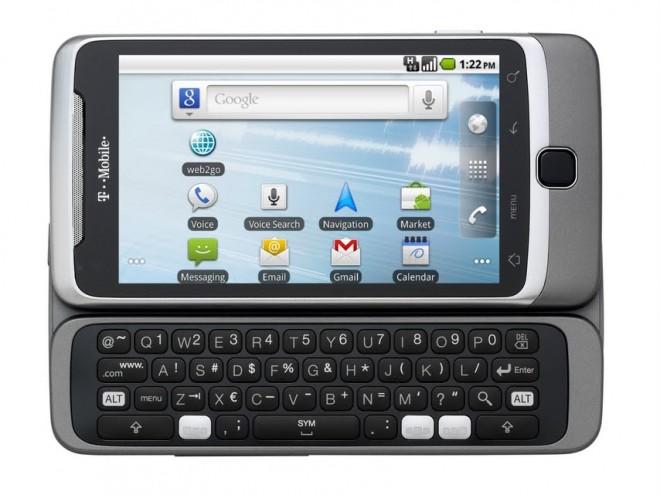
So when the G1 was announced I ordered it that same day.... so I guess the question is, why have I not already ordered the G2. Well that is hard to say. It was easy to select the G1... it was the first of its kind, it was revolutionary, it was amazing. The G2... well its great too.... but is it that great?
It has the 3 main requirements I think every smartphone should have:
- a state-of-the-art OS, such as Android
- a touchscreen (preferably big enough to be clear and useful)
- a qwerty physical keyboard (virtual is nice, but nothing compared to the tactile feel of real keys)
The G2 also has one other key feature I think should be default on any smartphone that wishes to play the role of a convergence device... a 3.5mm audio jack.
So what separate this from other devices.... well see that is why I've not purchased it already. The HTC/T-Mo MyTouch Slide, the Verizon Droid2 from Moto and the Samsung Epic 4g on Sprint among many other phones have these same main features.
So why will I most likely order this device... well probably because I like Android as it is. All the other phones have some sort of modified interface, HTC Sense's they know what I want, Moto has Blur'd the interface and Samsung's TouchWiz... just ain't wise enough for me... okay enough of the cheese. I like the UI as Google designed it. If I wanted something else, I'd be running one of the many ROMs available for my G1, but nope I'm running CM since it is as close as you get to Vanilla when it comes to the UI.
So there you have my reasoning and my question... I'll update you all if/when I order one.All said, I'm debating just waiting till the 6th when it arrives in stores.
Sunday, September 12, 2010
Belated Phone Friday: Apps currently on my phone
So like I figured.... I knew I'd miss one or at least be late. So here it is... late better than not.
Last week I listed sites to help get you started with Android. Today I'd like to discuss further one of those sites: http://appbrain.com.
AppBrain helps you interact with the App Market via a simple web interface Plus with the help of its two sister apps 'AppBrain App Market' and 'Fast Web Installer', you can search and install apps from either the web or the application. But one of my favorite parts about AppBrain is that it keeps track of what you have on your phone and allows you to share your list with others.
So here is my list: plus the nice part is that it will automatically update when I update my list
Next week: hopefully I'll give a full rundown of what I think my next phone will be now that the G2 was officially announced last week.
Last week I listed sites to help get you started with Android. Today I'd like to discuss further one of those sites: http://appbrain.com.
AppBrain helps you interact with the App Market via a simple web interface Plus with the help of its two sister apps 'AppBrain App Market' and 'Fast Web Installer', you can search and install apps from either the web or the application. But one of my favorite parts about AppBrain is that it keeps track of what you have on your phone and allows you to share your list with others.
So here is my list: plus the nice part is that it will automatically update when I update my list
Next week: hopefully I'll give a full rundown of what I think my next phone will be now that the G2 was officially announced last week.
Friday, September 03, 2010
Phone Friday: sites to get you started with Android
So it seems like lately the only posts I've managed to maintain doing is this "phone friday" concept that my friend Ben suggested. This week I'd like to discuss something slightly different but related. Instead of discussing what I'm doing with my phone, some suggestion on how to get started with your phone.
So why this post.... well on Tuesday, my boss asked me a bunch of questions since she is thinking about going 'Droid' and then yesterday my dad started asking me a bunch of questions since he had just ditched his Windows Mobile Moto Q in favor of the 'Droid2'... and this after a good friend of mine from Miami got the Evo (the same friend who convinced me to get my first Treo). Also another friend of mine upgraded from the Centro to an Evo too.... but basically all of them know that I've been using Android since the start. I ordered my G1 minutes after the site went life after the Google T-Mo announcement was made and it arrived in hand the day before it hit stores.
Anyways so for those out there new to Android or considering it.... the basic question I get is 'is there an app for X' and the basic answer is... most likely. (not yes since I'm sure that there is always one feature/app missing from every phone market).
So some suggestions if you are planning to make the switch to Android first stop.... the blogosphere (in no order):
So why this post.... well on Tuesday, my boss asked me a bunch of questions since she is thinking about going 'Droid' and then yesterday my dad started asking me a bunch of questions since he had just ditched his Windows Mobile Moto Q in favor of the 'Droid2'... and this after a good friend of mine from Miami got the Evo (the same friend who convinced me to get my first Treo). Also another friend of mine upgraded from the Centro to an Evo too.... but basically all of them know that I've been using Android since the start. I ordered my G1 minutes after the site went life after the Google T-Mo announcement was made and it arrived in hand the day before it hit stores.
Anyways so for those out there new to Android or considering it.... the basic question I get is 'is there an app for X' and the basic answer is... most likely. (not yes since I'm sure that there is always one feature/app missing from every phone market).
So some suggestions if you are planning to make the switch to Android first stop.... the blogosphere (in no order):
- http:
/ /www.absolutelyandroi d.com - http://androidandme.com/
- http://www.androidcentral.com/
- http://phandroid.com/
- http://www.droid-life.com/
- http://www.droiddog.com/
- http://www.droidstone.com/
- http://androinica.com/
These sites are great for news and rumors about whats to come and for app reviews.
Now on the app front a few sites to check out, they all provide a web-based look at the Market.
- http://www.appbrain.com/ - this is a must... plus make sure to install the "Fast Web Installer" so you can install apps directly from the site.
- http://www.cyrket.com/m/android/ - the first site to provide web access to Market... this site is also good if you don't use Android since it also provides a window into apps for WebOS and WinMo (sorry iPhone users... you're out of luck)
- http://www.androlib.com/ - just another site.... also provides QR Codes which you can scan from your phone to go directly to links in Market
Now for those who like to get into 'trouble' and hack with your phones... (attempt at your own risk)
- http://www.cyanogenmod.com/ - probably the most popular Rooted Mod out there, initially started as a one-man project, but the team that has formed around it is amazing...hell they've got FroYo 2.2 running on a G1 (which I'm currently using)
- http://androidspin.com/ - great site for information on mods/roms and other hacks for Android.... plus a great source of news relating to rooted phones.
- http://www.xda-developers.com/ and http://forum.xda-developers.com/ - probably the best site for finding any solution you need relating to Android (or WinMo for that matter). The forums cover basically everything... if the question has been asked... you'll probably find a running discussion on XDA-Developers.
So if that isn't enough links to get you started...
Friday, August 27, 2010
Phone Friday: File mangers
So another Friday another posting. I love my Android phone. And it happens to be the first Android phone the G1. Recent basically confirmed rumors have the release of its first true successor soon to be released the ...wait for it... the G2 (I guess the name is better than the G1Blaze). It looks to have a kickass processor a great screen and most importantly... a full keyboard. Anyways.... that is not what I wanted to talk about today.... so today I'm looking for the best File Manager app for Android... do a quick search on AppBrain and you get a pretty big list.
So the way I see it, there a a few things to think about when selecting a file manager.
So currently I'm running Open Manager its nice... its got a small footprint and some decent features... it doesn't have the greatest GUI, but it works.
I've played with many others.
most likely eventually I'll end up back using either AndroZip or Linda. Both seem to be my fall backs when I really need a file manager. So what I'm really curious about is which do you like. have you tried others? please share!
So the way I see it, there a a few things to think about when selecting a file manager.
- features (multi select is a must, edit, copy, delete go without saying)
- footprint (there is no reason a file manager should take up your entire phone)
- bloat (for me a file manager should be just that a file manager.... not a swiss army knife... goes back to me footprint comment.
So currently I'm running Open Manager its nice... its got a small footprint and some decent features... it doesn't have the greatest GUI, but it works.
I've played with many others.
| app | pro | con |
| EStrongs File Explorer | feature full | large footprint, bit bloated with features not needed in a file manager |
| Linda File Manager | feature full and relatively small | funky name and funky GUI |
| AndroZip File Manager | feature full and relatively small | initially designed as a Zip app, but does the trick as a file manager. |
| ASTRO File Manager | feature full and one of the first out on the market | grown very bulky over time |
| OI File Manager | very small. can be integrated with other apps, great developers | very few features |
most likely eventually I'll end up back using either AndroZip or Linda. Both seem to be my fall backs when I really need a file manager. So what I'm really curious about is which do you like. have you tried others? please share!
Friday, August 20, 2010
Phone Friday: Boredum Killers for Android
A friend of mine started a post last Friday titled 'Phone Friday'... its a great idea, so I decided to attempt to do the same (whether I'll be able to keep it up or not is a different story, he is doing pretty well and has released his post already today).
So for my first Friday phone post.... Apps I've found for killing time with Android.
So for my first Friday phone post.... Apps I've found for killing time with Android.
- Google Reader (mobile web) - So when I don't want to look like a kid playing on my phone... this is where I turn. I've tried many of the apps for RSS and Google Reader, but so far none work as well for me as the Mobile version of Google Reader
- Solitaire by Ken Magic - This was probably one of the first apps I ever installed on my G1 when it first arrived, and if I'm not mistaken it was the first solitaire game on Market. Its simple, and has 4 games (only had three when it first arrived). It has the traditional Klondike and also Spider, Freecell, Forty Thieves. When I first got it... I spent most of my time with Spider.... then it was Klondike, but lately it has been back to Freecell. The game keeps track of your history so that you can see your stats and know how well (or poor) you've been doing... and when you get really bad... you can always clear the stats.
- Andoku Sudoku by Markus Wiederkehr - Sudoku is probably my biggest time consumer....I've tried many of the Sudoku apps but this one has kept my attention the longest. It works and has losts of built in games. The interface is pretty simple and works for me. The other notable mention for sudoku would have to be Open Sudoku. Both are simple no frills interfaces that work for good sudoku time. Also one app I've heavily considered purchasing is Sudoku Camera. Sudoku Camera does what you'd expect, takes pictures of a print sudoku and then lets you fill it in on your phone, plus it works with both Andoku and OpenSudoku.
- Alchemy by Andrey "Zed" Zaikin - Alchemy is my latest time killer... It is a great little game where you get to play an alchemist. Its pretty simple... start off with the four elements (water, air, earth, and fire) and combine them to create new elements.... combine those to create even more.... sounds easy.... its not... and you can spend hours..... well I have and from the looks of the forum post online.... many others have too.
So there you have it my first "phone friday" posts.... next week....well we'll figure that out next week.
Subscribe to:
Posts (Atom)