
Showing posts with label g1. Show all posts
Showing posts with label g1. Show all posts
Monday, October 11, 2010
Breaking news: G2s ordered
Friday, September 24, 2010
Phone Friday: My Next Phone?
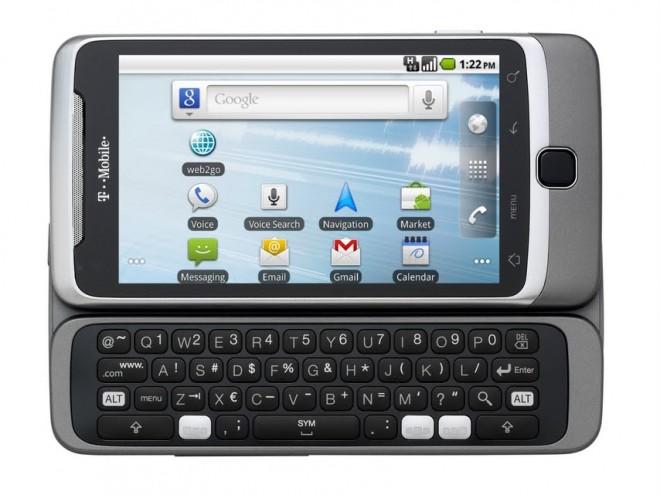
So when the G1 was announced I ordered it that same day.... so I guess the question is, why have I not already ordered the G2. Well that is hard to say. It was easy to select the G1... it was the first of its kind, it was revolutionary, it was amazing. The G2... well its great too.... but is it that great?
It has the 3 main requirements I think every smartphone should have:
- a state-of-the-art OS, such as Android
- a touchscreen (preferably big enough to be clear and useful)
- a qwerty physical keyboard (virtual is nice, but nothing compared to the tactile feel of real keys)
The G2 also has one other key feature I think should be default on any smartphone that wishes to play the role of a convergence device... a 3.5mm audio jack.
So what separate this from other devices.... well see that is why I've not purchased it already. The HTC/T-Mo MyTouch Slide, the Verizon Droid2 from Moto and the Samsung Epic 4g on Sprint among many other phones have these same main features.
So why will I most likely order this device... well probably because I like Android as it is. All the other phones have some sort of modified interface, HTC Sense's they know what I want, Moto has Blur'd the interface and Samsung's TouchWiz... just ain't wise enough for me... okay enough of the cheese. I like the UI as Google designed it. If I wanted something else, I'd be running one of the many ROMs available for my G1, but nope I'm running CM since it is as close as you get to Vanilla when it comes to the UI.
So there you have my reasoning and my question... I'll update you all if/when I order one.All said, I'm debating just waiting till the 6th when it arrives in stores.
Monday, June 07, 2010
Debating whether to upgrade to the MyTouch Slide from my G1
So last week the MyTouch Slide was release by HTC for T-Mobile.I've been using the G1 since.... well lets say, its been a long time. I love my G1, its rooted and running CM5.0.7 Eclair ROM. It tethers, runs app from the SD, and basically does everything I could need. But its be definition 'old' compared to newer phones on the market. Since the G1's release, a number of almost amazing phones have come out on other carriers, but nothing really amazing on T-Mo. There is the MyTouch, the Moto Cliq, and Samsung Behold, but none of them have the physical keyboard that the G1 has, same goes for the really almost amazing Nexus. There are other slick androids on other carriers, but they have the issue with being on another carrier and I have no reason to leave T-Mo.
So along comes the new MyTouch Slide... lets start with the pluses
So along comes the new MyTouch Slide... lets start with the pluses
- Initial OS 2.1 plus near guarantee that it will be upgraded to FroYo (2.2)
- Memory....512MB ROM vs 256MB, 512MB RAM vs 192MB
- 5megapixel camera with flash.
- 3.5mm audio jack
downside:
- only 72 addition MHz
- only 4 rows of keys on the qwerty (qwerty row doubles as number line)
really that isn't a very long downside list, but overall it is just not enough to make me run to the store. Unfortunately there really isn't anything more exciting being rumored for T-Mo. My minimum requirements for a new smart/super phone:
- min 1GHz snapdragon or equiv
- 3.7" or greater OLED screen
- 3.5mm audio jack
- full qwerty keyboard with preferable 5 rows
So here is to hoping T-Mo adds something soon to the list... but if not... I think at the end of the summer I will be making the switch to the new MyTouch Slide.
Monday, April 12, 2010
Rooting My HTC Dream/T-Mobile G1
So I lasted a week (barely)....steps to reroot my G1 below. These steps are taken from a multitude of sights, see list of references at end.
1. Make sure SD Card is format Fat32, if not, reformat to Fat32 (note you will loose everything on the SD Card)
2. Downgrade to RC29 (Running Cupcake 1.5, at the start of this process I was running the latest official Donut ROM from T-Mobile)
5. root using flashrec
you should now be running 1.5 CRC1 next step download and install flashrec.apk found at Zen Thought or RyeBlog
6. Download desired ROM and flash.
 I personally prefer Amon_RA's or ClockworkMod so while installing a recovery image is not rocket science Clockwork's ROM Mananger App makes it even simpler. Using ROM Manager I installed Amon_RA's latest.
Reference Links (no order):
1. Make sure SD Card is format Fat32, if not, reformat to Fat32 (note you will loose everything on the SD Card)
2. Downgrade to RC29 (Running Cupcake 1.5, at the start of this process I was running the latest official Donut ROM from T-Mobile)
- Download the file DREAIMG-RC29.zip
- Unzip the file DREAIMG.nbh and copy it to your SD card home directory,
- Power off your phone first and then hold down the camera button while powering it back on.
- When prompted, press the power button to begin the downgrade. Wait for it to finish and display the rainbow screen. Press Talk+Menu+Power to reboot your phone (or just pop your battery out once the downgrade has finished)
- Download the files signed-kila-ota-148830.de6a94ca.zip and signed-kila-CRC1-from-CRB43-FIX.7ca4a1d7.zip
- Rename the first file to update.zip
- Reboot your phone into recovery mode. Power off the phone first and then hold down the Home key while powering it back on.
- flash update
- The recovery mode is finished loading when you see the ! mark inside the triangle.
- Press Alt+L to display the list of options.
- Press Alt+S to flash the file update.zip.
- Rename the second file to update.zip
- Reboot your phone into recovery mode. Power off the phone first and then hold down the Home key while powering it back on.
- flash update
- The recovery mode is finished loading when you see the ! mark inside the triangle.
- Press Alt+L to display the list of options.
- Press Alt+S to flash the file update.zip.
5. root using flashrec
you should now be running 1.5 CRC1 next step download and install flashrec.apk found at Zen Thought or RyeBlog
- under "System Settings" "Application Setting" check "Unknown Sources"
- using favorite FileManager install
- open "recovery flasher" application
- press "Backup Recovery Image"
- when complete press "Flash Cyanogen Recovery 1.4"
6. Download desired ROM and flash.
Reference Links (no order):
- http://androidandme.com/2009/08/news/how-to-root-a-t-mobile-g1-and-mytouch-3g-android-phone/
- http://androidandme.com/2009/10/beginners/guides/how-to-manually-install-the-official-t-mobile-android-1-6-on-your-g1/
- http://forum.xda-developers.com/showthread.php?t=538456
- http://theunlockr.com/2009/10/15/how-to-root-a-donut-phone-android-1-6/
- http://theunlockr.com/2009/07/05/how-to-unroot-your-t-mobile-g1/
Monday, April 05, 2010
Unrooting my Android based T-Mobile G1
So if you know me or have been following this blog one of my favorite hobbies is messing with my Android G1. I purchased the phone the day it was announced and had it in hand before it was in stores. And shortly after Google and T-Mobile decided to lock us out of root access... I rooted by phone with JesusFreke's Mod and then Cyanogen's.... anyways over the last month or so I've been playing with lots of different ROMS.I've tried the SuperROMS, KingKlick's, Enomther's, and OpenEclair. So after all that my phone is a bit 'fragged' (not technically, but emotionally) when I went to return to Cyanogen's latest ROM...nothing seemed to work. So I decided to give the standard unrooted version a shot for a week.
First task unroot phone. Thanks to AndroidandMe.com and this howto:
http://androidandme.com/2009/10/beginners/guides/how-to-manually-install-the-official-t-mobile-android-1-6-on-your-g1/
A few updates later... I was running the official T-Mobile G1 version of Android 1.6.
Next step reload all the software and enjoy.
So that has been the hard part.While the experience has been smooth, the 'lost' features are getting hard to be without. So what I miss...
So overall after only 2 days experience with the same version of Android that the bulk of users I can see why everyone hasn't rooted their phones.... The experience is simple and smooth. This all said I don't think I'll make it a week.
update: 5 days and I'm done...I'm tired of having to uninstall apps since their isn't enough room on the internal memory...now to decide between Cyanogen or Super-D (sticking with 1.6, I'll wait on Eclair till they get proper drivers)
First task unroot phone. Thanks to AndroidandMe.com and this howto:
http://androidandme.com/2009/10/beginners/guides/how-to-manually-install-the-official-t-mobile-android-1-6-on-your-g1/
A few updates later... I was running the official T-Mobile G1 version of Android 1.6.
Next step reload all the software and enjoy.
So that has been the hard part.While the experience has been smooth, the 'lost' features are getting hard to be without. So what I miss...
- Apps2SD: The T-Mobile G1 is pretty limited when it comes to space for applications, without this mod I have to really think about which apps I want and need.
- wired tethering: while I haven't really needed it since I unrooted, but I know I will.
- backlight control: this is really not a problem for most G1's but the keyboard on the Bronze G1 (the one I have) can be difficult to read in the light when the backlight is on. With root and 'Backlight Off' this problem is solved.
- more than 3 screens: while really this is not a big issue, it just sometimes helps to have more screen real-estate.
- Feels a bit slower than the modded ROMS... but that makes sense since most of ROMS also include some sort of overclocking and efficiency improvements.
- Market has a tab for 'T-Mobile Picks'
- In terms of force closes... they seem to be about the same, which leads me to believe that the issues are related to the apps themselves and not the OS.
- battery life seems to be slightly worse... but then again I may have used my phone a bit more today.
So overall after only 2 days experience with the same version of Android that the bulk of users I can see why everyone hasn't rooted their phones.... The experience is simple and smooth. This all said I don't think I'll make it a week.
update: 5 days and I'm done...I'm tired of having to uninstall apps since their isn't enough room on the internal memory...now to decide between Cyanogen or Super-D (sticking with 1.6, I'll wait on Eclair till they get proper drivers)
Sunday, March 14, 2010
OpenEclair on my G1 and liking it!
So Eclair (Android 2.0) has been out for some time now, but unfortunately not for the G1. There are a number of roms out there that attempt to port eclair to the G1. I initially selected WG-OpenEclair, but it has bluetooth issues so I upgraded to the OpenEclair-DietEclair rom.... which unfortunately also has bluetooth issues with 1.2.2 which are fixed but won't be release till 1.2.3. So currently I'm reading and learning how to compile my own rom so that I can always see the latest and greatest benefits from OpenEclair. So anyways some notes on OpenEclair:
ps: don't expect me to start producing roms for mass distribution... really I only will building roms in an attempt to help solve bugs associated with the G1.
- initally felt quick, but many apps occasionally start with a slight delay, still quick though
- video camera fails (known issue when I started)
- metamorph fails (I don't use it, so I really don't care)
- live background kick ass (but don't know it they are necessary)
- sound issues with media audio (phone and speakerphone okay, possibly a hardware issue on my end)
- video playback issue including youtube and the weather channel (but also a known issue)
- bluetooth doesn't work (also known issue and has been fixed and will be release with next version)
- reboot to recovery, nice (most roms will schedule a reboot by holding the power button, this one also provides access to reboot to the recovery system, really a nice touch in my mind and should be in all roms)
ps: don't expect me to start producing roms for mass distribution... really I only will building roms in an attempt to help solve bugs associated with the G1.
Thursday, March 11, 2010
WG-OpenEclair
So I installed @wesgarner's OpenEclair rom based on ASOP1.6 tonight... while I can't really comment on its performance, I didn't want to comment on the process. Since I've been flashing my G1 regularly to try new roms I'm getting pretty quick at it, but this was by far the fasttest....
process:
some timing notes:
I had all my apps reinstalled and data restored by: 11:15 (thanks to MyBackupPro)
Some other quick comments:
process:
- download update.zip (http://db.androidspin.com/android_developer_display.asp?developerid=63)
- preform full backup of data and apps with MyBackupPro (or other).
- reboot into recovery (I use Amon_Ra's) and perform complete nandroid+ext backup (always good to have a full backup with Nandroid to return your device to its previous state).
- preform the various wipes: sd:ext, dalvik-cache, data/factory
- flash [any] zip from SD
- wait.......watch with 'adb logcat' if you have adb installed and are curious.
some timing notes:
- started flash at: 10:24pm
- rebooted at 10:28pm
- g1 splash screen over at 10:29pm (now on 'android' screen)
- installation done: 10:30pm
- setup complete: 10:33pm
- initial sync complete: 10:38pm (i have lots of stuff)
- phone rebooted: 10:41pm (habit)
- reboot complete: 10:42pm (quick)
I had all my apps reinstalled and data restored by: 11:15 (thanks to MyBackupPro)
Some other quick comments:
- the system wicked quick, and reboots quick too (only takes abit more than a minute)
- new features:
- back up settings to google account
- 2.x goodies like facebook account and new lock screen
- comes with Astro preinstalled
G1 Experience: CM 4.2.15.1
So last week I tried Super-D. After I gave enomther's rom a quick try (a real quick try, about 15minutes). So then I loaded the current CyanogenMod 4.2.15.1. So like expected, smooth as can be. everything seem to work smoothly. No unusual 'force closes' or other crashes. I don't know why, but it doesn't seem as smooth as Super-D. Probably just the fact that I loaded the version with the Nexus Launcher. So I've decided to give one of the Eclair versions a try. Don't get me wrong, if you want to root your phone I'd recommend giving CM a try, or Super-D... but basically they are all almost built upon Cyanogen's source anyways, so you might as well start with CM.
Tuesday, March 09, 2010
Enomther on my G1
So yesterday I wrote about my experience. My plan was today to flash my G1 with the @enomther's rom. So this evening I did. I was really looking forward to it, but then I realized that I really have gotten use to the updates that @cyanogen had added and that were also in Super-D. So while enomther's rom was smooth and quick, I've reflashed my rom, this time with cyanogen's latest.
Monday, March 08, 2010
Super-D: a new Rom for my G1
There are many reviews of Android roms out there and many with much better details than this one here. If you are really interested in rooted roms for your G1 or other Android device check out: AndroidSpin and XDA forums. Once Google 'closed' Android on their T-Mobile devices (the developer versions are never locked), the 'hackers' started spinning root versions almost immediately. I started initially using JesusFreke's, then as he called it quits moved to Cyanogen's. While I can definitely say that I've been quite happy with CM, I recently decided to give others a try.
So last week with help of the Android community, I installed the DangerSPL. Installing DangerSPL provided the ability to try other Roms. So I decided to try Super-D by Ben Buchacher. Super-D is another rom for G1 devices. It uses a lot of the improvements Cyanogen has provided and adds a few others including various Eclair updates like the Launcher.
Like I said, I've been very happy with Cyanogen's mods and only decided to try others for the fun of it. Since I'm not an app developer of rom spinner, this review is largely based on plain average use. With CM most everything works, and since for the most part Super-D is based on CM, well you get the same stability. What Super-D adds is more.... As an every day user, I've not had any problems with Super-D. It is quick and I've had very few Force Closes than before. Battery life has also been good. A while back CM added wired-tethering, but I was never able to get it to work, but with Super-D it works great.
Overall I've been very happy with Super-D. If you are considering rooting your G1, give Super-D a try. As for me... now off to try the latest Cyanogen... or maybe KingKlick's.... or maybe OpenEclair. I'll post my feelings about other roms as I try them.
update: I decided to go with enomther's rom for my next trial. (http://forum.xda-developers.com/showthread.php?t=538456)
So last week with help of the Android community, I installed the DangerSPL. Installing DangerSPL provided the ability to try other Roms. So I decided to try Super-D by Ben Buchacher. Super-D is another rom for G1 devices. It uses a lot of the improvements Cyanogen has provided and adds a few others including various Eclair updates like the Launcher.
Like I said, I've been very happy with Cyanogen's mods and only decided to try others for the fun of it. Since I'm not an app developer of rom spinner, this review is largely based on plain average use. With CM most everything works, and since for the most part Super-D is based on CM, well you get the same stability. What Super-D adds is more.... As an every day user, I've not had any problems with Super-D. It is quick and I've had very few Force Closes than before. Battery life has also been good. A while back CM added wired-tethering, but I was never able to get it to work, but with Super-D it works great.
Overall I've been very happy with Super-D. If you are considering rooting your G1, give Super-D a try. As for me... now off to try the latest Cyanogen... or maybe KingKlick's.... or maybe OpenEclair. I'll post my feelings about other roms as I try them.
update: I decided to go with enomther's rom for my next trial. (http://forum.xda-developers.com/showthread.php?t=538456)
Wednesday, March 03, 2010
Almost bricked my G1, Android Community to the rescue!
So I've been debating changing the SPL on my G1 to Danger SPL for some time, and today I finally decided to do so. Partially out of being impatient I started to panic that I had bricked my phone. So just before I started my Google search, I posted a quick comment on twitter... and within minutes the community was helping... in particular: @FHL09 and @simss22 .
Here is the twitter conversation log:
also, this is how Twitter is suppose to work!
Here is the twitter conversation log:
ckcin: not good... I think I've bricked my G1 installing Danger SPLbut basically there you have it... simms22 fixed my problem, not only did he fix my problem, he checked in with my an hour later to see how things were going. The Android Community rocks!
FHL09: @simms22 RT @ckcin: not good... I think I've bricked my G1 installing Danger SPL
FHL09: @simms22 lol it was a RT @ckcin thinks he bricked his after flashing the DangerSPL @_Qman
simms22: @ckcin why do you think youve bricked it?
ckcin: @simms22 never gets past the G1 splash screen... just reflashed the originall spl, lets see if that fixes it
simms22: @ckcin did you flash the current radio? when i did the danger spl, my phone sat on the g1 screen for 40 min. flashing the old spl is a no-no
ckcin: @simms22 hmmm...yes I've had the radio update since it was initilly released, I'll put the danger back on
simms22: @ckcin can you get into recovery at all?
ckcin: @simms22 yes, which gives me hope
simms22: @ckcin youre not bricked then. flash the radio, then spl, then wait it out. a brick cant access recovery.
FHL09: Love @simms22 always a huge help - @ckcin youre not bricked then. flash the radio, then spl, then wait it out. a brick cant access recovery.
ckcin: @simms22 cool thanks... I give it a try
ckcin: @simms22 okay.... flashed the radio, then the spl... now I'm waiting.... here is to hoping it all works out, thanks
FHL09: @ckcin good luck, fingers crossed
about 50minutes later:
simms22: @ckcin so... still waiting? it will probably through you back into recovery when its finished. flash htc's adp 1.6, dont reboot, let it do..
simms22: @ckcin ...its thing, flash cyanogenmod, then reboot.
ckcin: @simms22 yup still waiting... I already placed the cm rom on my sd so when it gets there I'll proceed
ckcin: @simms22 should 'adb logcat' work?
simms22: @ckcin youll need htc's adp 1.6 too
simms22: @ckcin yes, it should(i think) i dont use adb
ckcin: @simms22 adp 1.6 are you talking about the recovery image or the system image? or other
simms22: @ckcin this one---> http://www.mediafire.com/?1gqtzgzmdw4
ckcin: @simms22 thanks... still waiting... over 50minutes...
simms22: @ckcin power off(pull battery), boot into recovery and flash the adp 1.6, let it finish, flash cyanogenmod, then reboot.
ckcin: @simms22 fingers crossed
ckcin: @simms22 you are amazing, system up and running! thanks. And @fhl09 thanks for passing my panic to @simms22 you 2 rock!
simms22: @ckcin nice! :)
also, this is how Twitter is suppose to work!
Tuesday, October 13, 2009
Latest updates to my G1: moved from CyanogenModd 4.1.11 to CyanogenMod 4.1.999
A little over a month and half or so ago I wrote about switching from the JesusFreke Android Mods to the CyanogenMod (previous post). Shortly after that the Android community had its first scuffle with Google. When I initially switched to the CyanogenMod, I opted to stay with the 'stable' build, but as soon as I heard that Cyanogen was going to include Donut(1.6) in his experimental builds I had to switch to see what it was like. Unfortunately while all of us out there loved the fact that cyanogen was including 1.6, Google didn't like the fact that he was bundling 'closed-source' applications, and thus the scuffle began, and the community was in an uproar about Google not being as open as they claimed...
I made a few comments on Reddit and various blogs and news stories, but I never took the time to comment on my blog... well basically because I for the most part agreed with Google, there were other things that bothered me. As a developer I fully agree with the nature that some projects are and should be closed source applications while others should be open source. Android is an open source Operating System, not an open source bundle of applications... anyways so besides the slow-down to cyanogens mods, what bothered me with the whole situation was that the apps in question have all been available to other phones and devices for free for years, why couldn't Google just say "sorry modders, you can't include our closed sources apps with your builds, but we'll put the on Market or another location so your users can install them manually like they can on other smartphones and devices". Well from what I know they didn't, but thankfully Cyanogen stood up for what he wanted to do and work out a solution with Google where us users simply have to preserve the apps that are already on our devices and then install his updates and therefore he no longer has to include closed-source apps in his builds.
So with the solution at hand, cyanogen began work on the workaround and sure enough a short time later he had it up and working... only downside was that for the initial upgrade there were some significant additional steps. Between the following links, I'm sure you can figure them out... I did... well after a few tries... first the links then my issues with the process:
http://www.simplehelp.net/2009/10/04/how-to-install-cyanogenmod-4-1-99-on-your-g1-android-phone/
http://www.simplehelp.net/2009/10/06/how-to-update-cyanogenmod-from-4-1-99-to-4-1-999/
http://www.cyanogenmod.com/rom/cyanogenmod-4-1-999
So last week i upgraded... so some notes on my trials... well my first assumption was that I could skip the 4.1.99 build, and I probably could of... but my first attempt didn't work, so I tried again this time starting with the 4.1.99 build and as it turned out I didn't need to d the 4.1.99 build, but really we are only talking a few extra minutes (well maybe 15-20). So anyways my first mistake was that I decided to skip the initial 'WIPE' step... I figured whats the worse that can happen... well your phone will never finish the reboot that is what happened... well so I rebooted into the recovery system and restored from my nandroid backup (oh yes like I stated last time... NANDROID is your best friend when it comes to working with modded images).
So my next try... I WIPED my phone but this time I messed up again... I rebooted between the install of the HTC image and he cyanogen 4.1.99 image... I've read that it shouldn't make any difference, but in my case I was sure that was my next problem. But again it was not....
So again I restored from Nandroid... and this time I followed every step to the letter.. or so I thought... still had an issue... so I decided to connect my phone to my computer and lauch 'adb logcat' and sure enough, I finally saw my issue... while I thought I was wiping my phone... it turns out I was not. Turns out that the wipe feature on the cyanogen recovery images only blanks the built-in memory portion, not the portion moved to the sdcard's ext partition. So off to Google to research how to blank the ext partition...well I found many helpful sites even a youtube video.. and well none of them worked for me... my solution just like last time... LINUX to the rescue. I popped out my card, stuck it in an SD adapter and into my computer, launched Gparted and reformatted the partition... I even upgraded it to ext3 from ext2 (probably could of selected ext4, but I didn't, if anyone has any suggestion or reason why I should, please share). I popped the card back into my G1 and ran through the update process again and yep everything worked...
So the moral of the story... WIPE WIPE WIPE before switching from Cyanogen 4.1.11 to 4.1.999
I made a few comments on Reddit and various blogs and news stories, but I never took the time to comment on my blog... well basically because I for the most part agreed with Google, there were other things that bothered me. As a developer I fully agree with the nature that some projects are and should be closed source applications while others should be open source. Android is an open source Operating System, not an open source bundle of applications... anyways so besides the slow-down to cyanogens mods, what bothered me with the whole situation was that the apps in question have all been available to other phones and devices for free for years, why couldn't Google just say "sorry modders, you can't include our closed sources apps with your builds, but we'll put the on Market or another location so your users can install them manually like they can on other smartphones and devices". Well from what I know they didn't, but thankfully Cyanogen stood up for what he wanted to do and work out a solution with Google where us users simply have to preserve the apps that are already on our devices and then install his updates and therefore he no longer has to include closed-source apps in his builds.
So with the solution at hand, cyanogen began work on the workaround and sure enough a short time later he had it up and working... only downside was that for the initial upgrade there were some significant additional steps. Between the following links, I'm sure you can figure them out... I did... well after a few tries... first the links then my issues with the process:
http://www.simplehelp.net/2009/10/04/how-to-install-cyanogenmod-4-1-99-on-your-g1-android-phone/
http://www.simplehelp.net/2009/10/06/how-to-update-cyanogenmod-from-4-1-99-to-4-1-999/
http://www.cyanogenmod.com/rom/cyanogenmod-4-1-999
So last week i upgraded... so some notes on my trials... well my first assumption was that I could skip the 4.1.99 build, and I probably could of... but my first attempt didn't work, so I tried again this time starting with the 4.1.99 build and as it turned out I didn't need to d the 4.1.99 build, but really we are only talking a few extra minutes (well maybe 15-20). So anyways my first mistake was that I decided to skip the initial 'WIPE' step... I figured whats the worse that can happen... well your phone will never finish the reboot that is what happened... well so I rebooted into the recovery system and restored from my nandroid backup (oh yes like I stated last time... NANDROID is your best friend when it comes to working with modded images).
So my next try... I WIPED my phone but this time I messed up again... I rebooted between the install of the HTC image and he cyanogen 4.1.99 image... I've read that it shouldn't make any difference, but in my case I was sure that was my next problem. But again it was not....
So again I restored from Nandroid... and this time I followed every step to the letter.. or so I thought... still had an issue... so I decided to connect my phone to my computer and lauch 'adb logcat' and sure enough, I finally saw my issue... while I thought I was wiping my phone... it turns out I was not. Turns out that the wipe feature on the cyanogen recovery images only blanks the built-in memory portion, not the portion moved to the sdcard's ext partition. So off to Google to research how to blank the ext partition...well I found many helpful sites even a youtube video.. and well none of them worked for me... my solution just like last time... LINUX to the rescue. I popped out my card, stuck it in an SD adapter and into my computer, launched Gparted and reformatted the partition... I even upgraded it to ext3 from ext2 (probably could of selected ext4, but I didn't, if anyone has any suggestion or reason why I should, please share). I popped the card back into my G1 and ran through the update process again and yep everything worked...
So the moral of the story... WIPE WIPE WIPE before switching from Cyanogen 4.1.11 to 4.1.999
Tuesday, August 25, 2009
Updates to my G1: Cyanogen Mod and Apps to SD
Well everybody knows my favorite gadget is my G1. I ordered it back in September, about 1hr after the release event. I was blogging about it almost immediately: http://palmaddict.typepad.com/palmaddicts/2008/10/day-15-with-my.html . I've been twittering about it and from it too. So if you've been following my latest twits... for the last few days I've been looking at modding my G1 (again). When the G1 with Android first came out, it gave all of us users 'root' access (for those of you who don't know what this means... then you don't want it, but for those of us who do....) shortly after, Google closed the door with and with the following release 1.1, root was gone :-(. Well it only took a matter of time (which we all knew) before some one had hacked it. JesusFreke was the first that I know of and I quickly installed.
When the official Cupcake release came out, we were off to India, and regardless, I needed to wait for JF to release his update so that I could continue to have root which also came out shortly after we arrived in India. So I waited till I got back to the states... but yes as soon as I got back, I updated... Anyways... the update worked fine, things looked great but I had a few more force closes and such... some apps weren't happy, but what do you expect...
The next thing I wanted to do was move my apps to the SD card, why, well the one major drawback of the G1 is the limited storage space. Yes you can use an SD card, so that gives you lots of space for media and documents... but that is about it, all your apps are locked to the built-in storage. With root access I moved all my cache files to the SD card that almost doubled the space for apps but still not enough, so the solution was to move the apps to the SD. There are lots of methods and such and a simple google search reveals them. Then I saw this post: http://jf.andblogs.net/2009/08/20/calling-it-quits/ and well that was sad news... but he nicely enough point us all at a replacement rom, cyanogen's.
So 2 nights ago, while my wife and a friend were watching True Blood on HBO, I decided to move forward. I first finally did a Nandroid backup, something highly recommend before making changes (one thing I've never done in the past). Then I downloaded and updated my rom. Well the first go around... bad... the phone never booted back up... but I had access via the adb shell... and was able to find the issue and google an answer (which was to remove the dalvik-cache). So shortly after, my phone was back up and running... sort of. All my apps were complaining and force closing... so next step... the dreaded wipe of the system, thankfully that fixed everything and after about an hour of downloading and installing apps, I was back where I 'started', but not the new rom took up more space on the internal memory and I definitely had to to the apps to sd move.
This is where my new troubles began... (first off I didn't do another Nandroid backup like I should have, and still haven't). I read that I was not suppose to run and additional apps2sd hacks on top of the cyanogen mod, but I assumed that it meant the apps to control the mod, not the process to perform the mod... big misunderstanding... I tried on instruction set and all went to hell...the partition didn't take but the mod still moved over my 'data' directory and then the phone was 'fried'. I had to remove the card and then copy the update image to it, and then go through the whole update process again, hence why you should always backup via nandroid before any changes. ... So after giving life to my phone again and rebuilding the data on my card I decided that I'd just try gparted on my ubuntu box (and for those of you know... my desktop died last december... and my new box was literally only setup days before I started this mission, so the fact that I had a desktop with ubuntu was something... and while I have ubuntu on my netbook, the netbook was booted into winxp while I was performing all these changes on my G1 and I couldn't reboot it in the middle).
So Gparted came to the rescue... my plan was to simply partition the card and figure out the move later... the funny part was, that as soon as I stuck the card in, the cyanogen mod instantly took over and moved my apps to the card... so had I realized that before... I would of saved a few hours and a good headache...
So now I have a working G1 again, still with Root and not my apps are on the SD so I have plenty of space.... future updates.... bring it on...
but in summary... ALWAYS RUN A NANDROID BACKUP FIRST
and I should probably run one of those now ;-)
When the official Cupcake release came out, we were off to India, and regardless, I needed to wait for JF to release his update so that I could continue to have root which also came out shortly after we arrived in India. So I waited till I got back to the states... but yes as soon as I got back, I updated... Anyways... the update worked fine, things looked great but I had a few more force closes and such... some apps weren't happy, but what do you expect...
The next thing I wanted to do was move my apps to the SD card, why, well the one major drawback of the G1 is the limited storage space. Yes you can use an SD card, so that gives you lots of space for media and documents... but that is about it, all your apps are locked to the built-in storage. With root access I moved all my cache files to the SD card that almost doubled the space for apps but still not enough, so the solution was to move the apps to the SD. There are lots of methods and such and a simple google search reveals them. Then I saw this post: http://jf.andblogs.net/2009/08/20/calling-it-quits/ and well that was sad news... but he nicely enough point us all at a replacement rom, cyanogen's.
So 2 nights ago, while my wife and a friend were watching True Blood on HBO, I decided to move forward. I first finally did a Nandroid backup, something highly recommend before making changes (one thing I've never done in the past). Then I downloaded and updated my rom. Well the first go around... bad... the phone never booted back up... but I had access via the adb shell... and was able to find the issue and google an answer (which was to remove the dalvik-cache). So shortly after, my phone was back up and running... sort of. All my apps were complaining and force closing... so next step... the dreaded wipe of the system, thankfully that fixed everything and after about an hour of downloading and installing apps, I was back where I 'started', but not the new rom took up more space on the internal memory and I definitely had to to the apps to sd move.
This is where my new troubles began... (first off I didn't do another Nandroid backup like I should have, and still haven't). I read that I was not suppose to run and additional apps2sd hacks on top of the cyanogen mod, but I assumed that it meant the apps to control the mod, not the process to perform the mod... big misunderstanding... I tried on instruction set and all went to hell...the partition didn't take but the mod still moved over my 'data' directory and then the phone was 'fried'. I had to remove the card and then copy the update image to it, and then go through the whole update process again, hence why you should always backup via nandroid before any changes. ... So after giving life to my phone again and rebuilding the data on my card I decided that I'd just try gparted on my ubuntu box (and for those of you know... my desktop died last december... and my new box was literally only setup days before I started this mission, so the fact that I had a desktop with ubuntu was something... and while I have ubuntu on my netbook, the netbook was booted into winxp while I was performing all these changes on my G1 and I couldn't reboot it in the middle).
So Gparted came to the rescue... my plan was to simply partition the card and figure out the move later... the funny part was, that as soon as I stuck the card in, the cyanogen mod instantly took over and moved my apps to the card... so had I realized that before... I would of saved a few hours and a good headache...
So now I have a working G1 again, still with Root and not my apps are on the SD so I have plenty of space.... future updates.... bring it on...
but in summary... ALWAYS RUN A NANDROID BACKUP FIRST
and I should probably run one of those now ;-)
Friday, July 17, 2009
TasKiller for Android
 Everybody, well most everybody knows I have an Android-based HTC G1 (Dream), but it you check the archives, I rarely write about it here on the this blog. I from time to time write posts over at 'PalmAddicts' about my G1 and apps and such, but I felt like writing a post on my blog and I came across this nifty little app called TasKiller.
So if you are an Android user, this little app is worth the try. It also comes in a Non-Free version for €0.70 but I'm not really sure what the differences are and why you'd need it.
Friday, January 23, 2009
Official Last.FM client for Android: One less blog entry to write
For a while now I've wanted to sit down and start writing some blog post comparing competing apps... Currently there are at least 6 twitter clients, a good handful of clients for task/todo lists (some that include RTM syncing), a number of file managers, and a good handful of LastFM clients. I think there were 3 this morning. But today a new player entered the count: Last.FM. Today Last.FM has released a client for the Android with their name as the developer/company, so I guess this makes it an official client:
Last.fm – the Blog - Last.fm on Android
So while I won't go as far as saying the other client have no use, for me, I tend to prefer 'official' clients. The other clients have all served me well (heck well enough that I felt they all deserved to be installed on my G1 taking up space while I chose my favorite), and they probably all deserve to be compared sided-by-side, but for me, I'll be passing on the opportunity and will be shifting use to the 'official' client.
Thanks Last.FM... now if Pandora would finally release a client for Android...
So while I won't go as far as saying the other client have no use, for me, I tend to prefer 'official' clients. The other clients have all served me well (heck well enough that I felt they all deserved to be installed on my G1 taking up space while I chose my favorite), and they probably all deserve to be compared sided-by-side, but for me, I'll be passing on the opportunity and will be shifting use to the 'official' client.
Thanks Last.FM... now if Pandora would finally release a client for Android...
Monday, January 12, 2009
Pre WebOS and Synergy...wow!
Well I could of simply updated my previous post about the Pre, but I'd rather post a separate post.
Now that I've seen the videos of the Pre Demo [link to VentureBeat]... I'm in a bit more of a WOW stage... again to remind you I've always been a fan of Palm... I only switched to the G1 since I got tired of waiting for Palm to release their new OS and since the G1 was released on my current provider T-Mobile. Now while I still don't think I'll be switching from T-Mobile and my G1 to Sprint and the Pre, I'm really jealous of the Synergy technology... Palm does it again... it produces a product and produces it correct from the start... they don't have to add features we want, they are already there... now whether I need those features....
I don't think the Synergy feature will make any difference for those who use their phones for personal use, but for those of use who like to use our devices as a combination device for personal and work reasons, this is the answer and WOW! Synergy allows you to see all your contacts, calendars, and emails as one without having to actually combine them on your own and without actually mixing them up. If I heard correctly WebOS currently works with Google and Exchange. Also it conviently combines various types of communication, where it be email, chat, or SMS.... and the multitasking abilities they added via their 'Cards' also make life good.
The 'Cards' approach to multitasking is definitely and improvement on current multitasking approaches on small handheld devices. Also considering the fact that Palm's previous OS (the one on current Palms including the Centro) has no multitasking.... the is a giant improvement for Palm.
Basically on the OS side of the picture, I'm definitely impressed now that I've watched the video demos. Again I don't think I'll be switching to Sprint, but if it was to be released on T-Mobile, I would definitely have a decision to make.... For now, I don't really think I need the Synergy features. I've already move most everything to Google (which would actually make a migration to the Pre really simple) and we don't use Exchange at work (yet). Besides that, I know that there are several apps for the Android that allow it to work with Exchange so till I need Exchange and tried those apps, I don't know how much I would actually Synergy at this time... that doesn't stop me from being impressed... I'd even consider recommending it to Lauren since I'm pretty sure her future job will be using Exchange... I just don't know if Sprint is an available carrier for her. So for corporate (business/work) use, the Pre and WebOS definitely hits a home run in my mind... for personal consumers, I don't know how much difference there really will be for them between Android, the iPhone and now the Pre... I'm curious now though how the BlackBerry Storm will fair.
Now that I've seen the videos of the Pre Demo [link to VentureBeat]... I'm in a bit more of a WOW stage... again to remind you I've always been a fan of Palm... I only switched to the G1 since I got tired of waiting for Palm to release their new OS and since the G1 was released on my current provider T-Mobile. Now while I still don't think I'll be switching from T-Mobile and my G1 to Sprint and the Pre, I'm really jealous of the Synergy technology... Palm does it again... it produces a product and produces it correct from the start... they don't have to add features we want, they are already there... now whether I need those features....
I don't think the Synergy feature will make any difference for those who use their phones for personal use, but for those of use who like to use our devices as a combination device for personal and work reasons, this is the answer and WOW! Synergy allows you to see all your contacts, calendars, and emails as one without having to actually combine them on your own and without actually mixing them up. If I heard correctly WebOS currently works with Google and Exchange. Also it conviently combines various types of communication, where it be email, chat, or SMS.... and the multitasking abilities they added via their 'Cards' also make life good.
The 'Cards' approach to multitasking is definitely and improvement on current multitasking approaches on small handheld devices. Also considering the fact that Palm's previous OS (the one on current Palms including the Centro) has no multitasking.... the is a giant improvement for Palm.
Basically on the OS side of the picture, I'm definitely impressed now that I've watched the video demos. Again I don't think I'll be switching to Sprint, but if it was to be released on T-Mobile, I would definitely have a decision to make.... For now, I don't really think I need the Synergy features. I've already move most everything to Google (which would actually make a migration to the Pre really simple) and we don't use Exchange at work (yet). Besides that, I know that there are several apps for the Android that allow it to work with Exchange so till I need Exchange and tried those apps, I don't know how much I would actually Synergy at this time... that doesn't stop me from being impressed... I'd even consider recommending it to Lauren since I'm pretty sure her future job will be using Exchange... I just don't know if Sprint is an available carrier for her. So for corporate (business/work) use, the Pre and WebOS definitely hits a home run in my mind... for personal consumers, I don't know how much difference there really will be for them between Android, the iPhone and now the Pre... I'm curious now though how the BlackBerry Storm will fair.
Friday, January 09, 2009
Palm goes Pre/webOS
 Well as I'm sure many have heard... Palm has finally released its latest OS and device, the Pre. The new OS is named 'webOS', I guess they didn't like the name Nova? Anyways.... well as I'm sure you can expect... the blogosphere is all at flutter about the Pre...
Since I won't posting the specs, here are some useful links:
http://www.palm.com/us/products/phones/pre/
http://now.sprint.com/pre/?id9=vanity:palmpre
http://palmaddict.typepad.com/palmaddicts/2009/01/palm-unveils-al.html
http://mytreo.net/treo-and-palm-news/palm-pre-and-webos-announced/
So my take... looks nice, only problems... I don't think I want it. I'm hoping for Palm's sake that it is all that is cracked up to be. While I'll always be a Palm fan.... but after the endless (well I guess it has almost ended) wait for this new device and OS.... Anyways during the wait, the iPhone was released and I got an Android HTC G1.
To quickly rant my anti-iPhone stance... no the iPhone did not create the smartphone industry, it just stirred the pot very nicely, the industry was started mostly by Palm, RIM, and Symbian with help from MS, and both Palm and MS have always had a touchscreen (and a physical keyboard), the only thing the iPhone brought to the market was hype, and a pretty good platform that made others think. On the platform topic, Palm has supposedly been working on this new platform since well before the iPhone rumors started. As for RIM, Symbian, and MS... well Lauren has a Pearl and likes it, everyone I know with Symbian smartphones like them... and everybody with MS smartphones... well they tend to be mixed... my take on WinMo is that it is Windows (I like Office, not windows). And as I said, I got tired of waiting for Palm to release its new OS and when I heard that T-Mobile would be getting the G1 (the world's first Android phone) I knew which direction I was heading, and I'm very happy with my G1 (especially now that I regained root access to my phone).
And back to the Pre, yes the Pre looks really nice. The OS looks nice and clean, par with Palm's existence. The device is also clean looking and when you slide the keyboard out (yes if you haven't read the specs, it has a sliding keyboard) you get the nice surprise that it is a portrait keyboard (screen stays portrait unlike most HTC WinMo devices and the Android G1 which orients the phone landscape). I'm not sure which layout I like better.... I really like my G1, but I miss the keyboard sometimes of my old Treo 650, its probably because I was a lot faster typing on the Treo. Other specs I like, the camera has a Flash!, but that is not really that import to me... I don't take many pictures with my camera in the dark anyways.. and if I do, I'm usually taking pictures of lights so I wouldn't want a flash then either, but I can definitely see times I wish I did have a flash. Other specs I like the standard 3.5mm headphone jack and the microUSB connector (no more proprietary connectors). Only con with the specs... the phone seems a bit big.. the G1 is bigger than an iPhone, and about part with many of the newer sliding keyboard HTC WinMo devices, but the Pre, based on the specs seems bigger, and I'm assuming that is not with the keyboard extended... that could be a big downfall in these days with the sleekness of the iPhone, we'll see what people think when it hits the market.
So competing phones for each carrier... AT&T=iPhone, T-Mobile=Android G1, Verizon=Blackberry Storm, and now Sprint=Palm Pre.... so which one will 'win' well since they are all on different carriers... how can they loose? We'll have to see the results in Europe (yes Engadget has confirmed that the Pre will be released in other regions as a GSM phone).
So again, do I want the new Pre from Palm....no (well yes). Why not... primarily since I already have a G1, and secondly since the US release will be on Sprint. And while it has been confirmed that the Pre will be released in other non-Sprint regions as a GSM phone, I'm cheap and I like my US phone discounts. So for now here is to waiting for the device to arrive in the hand of people.. and for now, I'll keep enjoying my G1.
Tuesday, November 18, 2008
Reblog: G1 at the Races
 This weekend I was in Homestead for NASCAR's Ford Championship weekend. While maybe we might think that gadgets and NASCAR don't go together but you'd be surprised. Between the radio scanners and 'FANVIEW' (a great handheld tv screen to catch all the action)... and then the variety of cameras, and binoculars... and then the phones. NASCAR premier league, the Sprint Cup Series is sponsored by Sprint (was Nextel before the merger, and historically the Winston Cup). So Between Sprint advertising the Samsung Instinct everywhere, the numerous people with iPhones (and there were a lot) and then almost every make and model of phones out there... well I think my point is made, gadgets and NASCAR tend to go hand in hand.... This said, I was probably the only person I saw with a T-Mobile G1 at the track, and I did notice a number of 'curiosity' looks from people around me anytime I pulled out my phone.
So like I said, this weekend I was back home in South Florida for the NASCAR weekend. My first surprise was the phone reception... historically I've been with AT&T (well Cingular and Bellsouth Mobility before that) and I always had great reception, then last year when I went down after switching to T-Mobile, my Treo 650 had no reception (it worked perfectly fine the year before). So this year when my new G1 worked flawlessly I was amazed, I even had 3G.
Then secondly, I've heard many a complaint about the G1 and the camera, and actually I've heard similar complaints about the iPhone camera. Most of these complaints I heard relate to speed of taking a picture... well what do you expect a DSLR experience... so anyways I was not worried. I'd taken a number of pictures from the G1 already and I new that it was slow but it worked. At the same time, I like to watch the race with both eyes not through a camera lens... so I wasn't worried about taking a regular digital camera with me. Then when there I decided, heck why not try the camera out. This was my big surprise... well it didn't work well when the cars went flying by at 130MPH, but overall I was pleasantly surprised... the 3MP camera took some great shots, not perfect, but I can definitely live with these.
here is a collection of photos I took this past weekend, all from the G1: http://www.flickr.com/photos/nickc_321/sets/72157609359728904/
Friday, October 24, 2008
G1 Battery woes...
Well I know I've commented about the battery life, so I was interested to see this article today:
BetaNews | Making the G1's battery live longer than a soap bubble
It really doesn't say anything that the insert T-Mobile ships with the phone does, but I figure I'll give it a try and see if it makes a difference. Also on the topic of battery life, well it really isn't that bad... it goes from 100%-60% pretty quick but it takes a lot longer to go from 60%-30%. I've heard this before that the power curve is just that, a curve not linear, plus it really does depend on how you use it. The more games you play the faster the battery dies.
BetaNews | Making the G1's battery live longer than a soap bubble
It really doesn't say anything that the insert T-Mobile ships with the phone does, but I figure I'll give it a try and see if it makes a difference. Also on the topic of battery life, well it really isn't that bad... it goes from 100%-60% pretty quick but it takes a lot longer to go from 60%-30%. I've heard this before that the power curve is just that, a curve not linear, plus it really does depend on how you use it. The more games you play the faster the battery dies.
Thursday, October 23, 2008
2nd day with my G1, first problem
To let you all know, I've been writing for a blog called PalmAddicts for some time now. PalmAddicts started as a blog about Palm's but has grown to discuss almost any device that fits in your Palm. So since I received my G1 I simply felt like the community was the place to post my thoughts. Here is the link to my latest post:PalmAddicts: 2nd day with my G1, first problem
I'll be posting first to PalmAddicts on my G1 and I'll try to remember to post links to them here on this blog. If I can figure out a way to type the posts once and send them to everywhere I will... actually I think that there is a package for that... Spin something...ooh off to Google to search.
I'll be posting first to PalmAddicts on my G1 and I'll try to remember to post links to them here on this blog. If I can figure out a way to type the posts once and send them to everywhere I will... actually I think that there is a package for that... Spin something...ooh off to Google to search.
Subscribe to:
Posts (Atom)